The Fourays plugin
Fourays can be driven entirely with MIDI notes, CC messages and key switches, as described on the documentation page. Remembering which key switch is on which control channel is not much fun though, so there is now a plugin which presents the controls on a panel and sends the MIDI for you.
The plugin is a VST3. It does not produce any audio and it does not open a MIDI port of its own. It is placed on a track in your DAW, and the notes you play pass through it on their way to your Fourays.
Download
The current release is 4.000. What changed is on the changelog.
The plugin needs v4 firmware. It sends the configuration as control changes, which only v4 understands; it also sends it as SysEx, so a v3 device will take it if your DAW is not filtering SysEx. Use a plugin and a firmware from the same release. The configuration carries a version number, and a mismatched version is refused rather than partly applied. Firmware is on the updates page.
Installing
On Windows, run the installer. It copies the following:
| What | Where it goes |
|---|---|
| Plugin | C:\Program Files\Common Files\VST3\Fourays.vst3 |
| Presets | C:\Users\Public\Documents\VST3 Presets\Fourays\Fourays |
| Demo songs | C:\Users\Public\Documents\Fourays Demos |
There is no Linux installer, so a zip is provided instead. Fourays.vst3 is a
folder rather than a file, as VST3 plugins are on every platform; copy the whole
folder into ~/.vst3, and the presets into wherever your host looks for them.
Unlike VST2, VST3 plugin locations are fixed and cannot be configured in your host. On Windows they are searched in this order:
| Location | |
|---|---|
%LOCALAPPDATA%\Programs\Common\VST3 | per user, no administrator rights needed |
C:\Program Files\Common Files\VST3 | all users, where the installer puts it |
VST3 beside the host application |
Cubase's Plug-in Manager does let you add folders, but those paths apply to VST2 plugins only.
Setting up your DAW
The plugin is added as a rack instrument. You then add a MIDI track, set its input to the plugin and its output to your Fourays MIDI port, and point your note tracks at the plugin. The MIDI track must be monitoring, otherwise nothing reaches the device.
Each note track should have its MIDI channel set either to the channel you want
that part to play on, or to Any. A track set to Any passes each event
through on the channel it already carries, whereas a track set to a channel
number rewrites every event to that number, which will collapse several parts
onto one channel.
Nothing else needs configuring. The plugin's settings travel as ordinary control changes on chip 1's control channel, so a DAW that carries the notes carries the configuration too. Earlier versions sent it as SysEx, which Cubase filters by default, and the symptom was miserable: the notes and the knobs worked while the channel map silently never arrived.
The synth page
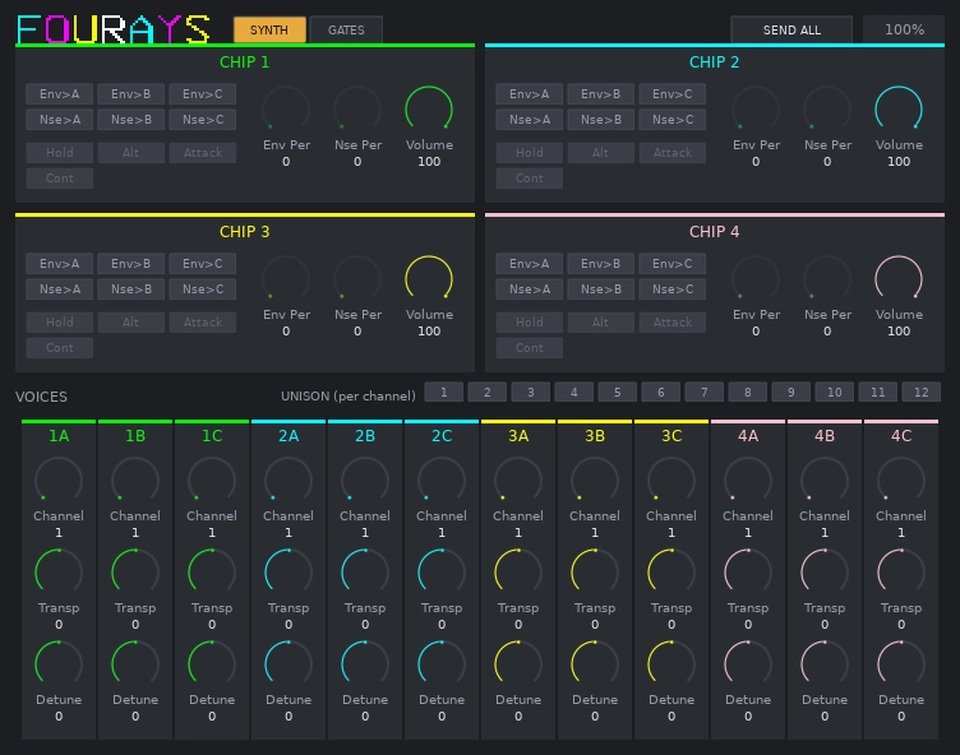
The synth page shows the four chips and the twelve voices, using the same colours that Fourays uses on its own screen. All of the controls are shown in the units the device itself uses. Envelope periods are envelope periods, note channels run from 1 to 16, and detune is the offset applied to the chip.
Each chip section has six switches which set where the envelope and the noise are routed, and four more which set the envelope shape. The shape switches are greyed out until the envelope is routed to at least one voice. Below these are the envelope period, the noise period and the chip volume.
Each voice strip controls one oscillator: the channel it plays on, its transpose and its detune. Any voice can be assigned to any channel, so voices 1A and 2B can both play channel 1 and give you a two oscillator part built from two chips with two separate envelopes.
The row of numbers beside VOICES sets the play mode for each MIDI channel. A channel set to unison plays every note on every voice assigned to it, so twelve voices on one unison channel will give you a twelve oscillator drone from a single key.
Envelope routing and volume
When the envelope is routed to a voice, that voice takes its volume from the envelope generator, and note velocity and chip volume no longer have any effect on it.
Each chip should generally be doing one or the other. Chips playing parts which need dynamics are best left with the envelope switched off. Chips playing sustained textures can have it routed, with CONTINUE and ALTERNATE set. No other envelope shape continues to move without being retriggered.
The gates page
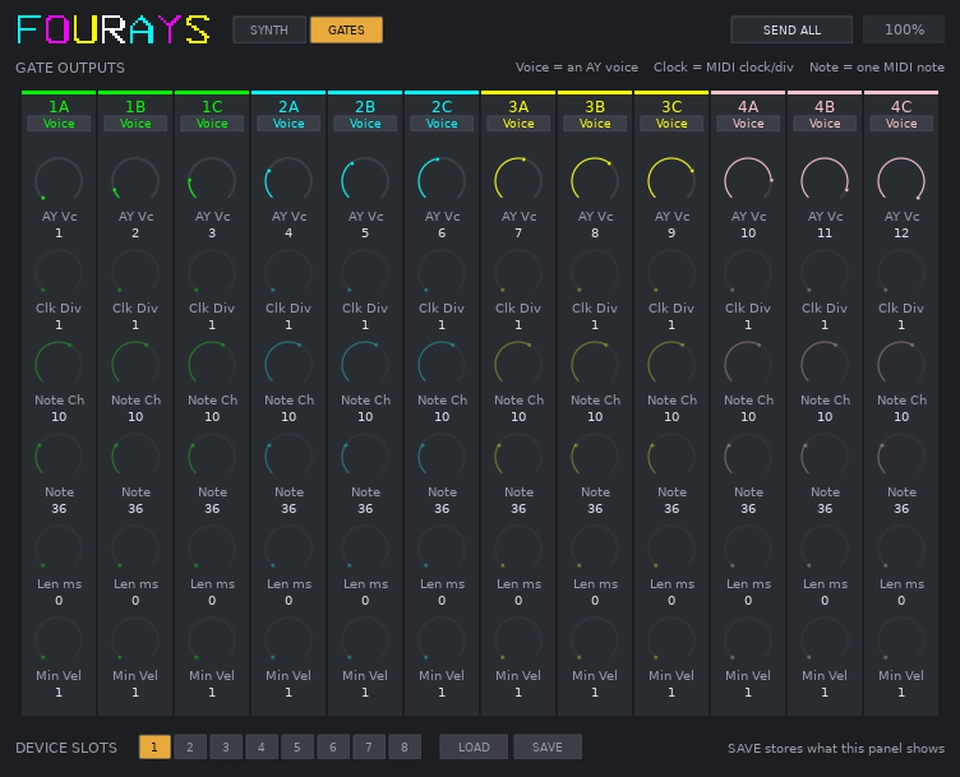
Fourays has twelve gate outputs, three per chip, named in the same way as the voices. They are independent of the audio outputs, so a gate can follow a voice, divide the MIDI clock, or be fired by a MIDI note of its own. The modes are:
| Mode | The gate opens on | Settings used |
|---|---|---|
| Voice | An AY voice playing a note | AY Vc |
| Clock | The MIDI clock, divided | Clk Div |
| Note | One MIDI note on one channel | Note Ch, Note, Len, Min Vel |
Settings which the selected mode does not use are greyed out.
Note mode is intended for driving other equipment. Point a gate at a note and give it a short gate length, so that the module being driven sees a trigger edge.
Accent outputs
A second gate can be pointed at the same note with a higher minimum velocity, so that it only fires on the hits played hard. The first gate is patched to your drum module's gate input and the second to its accent input.
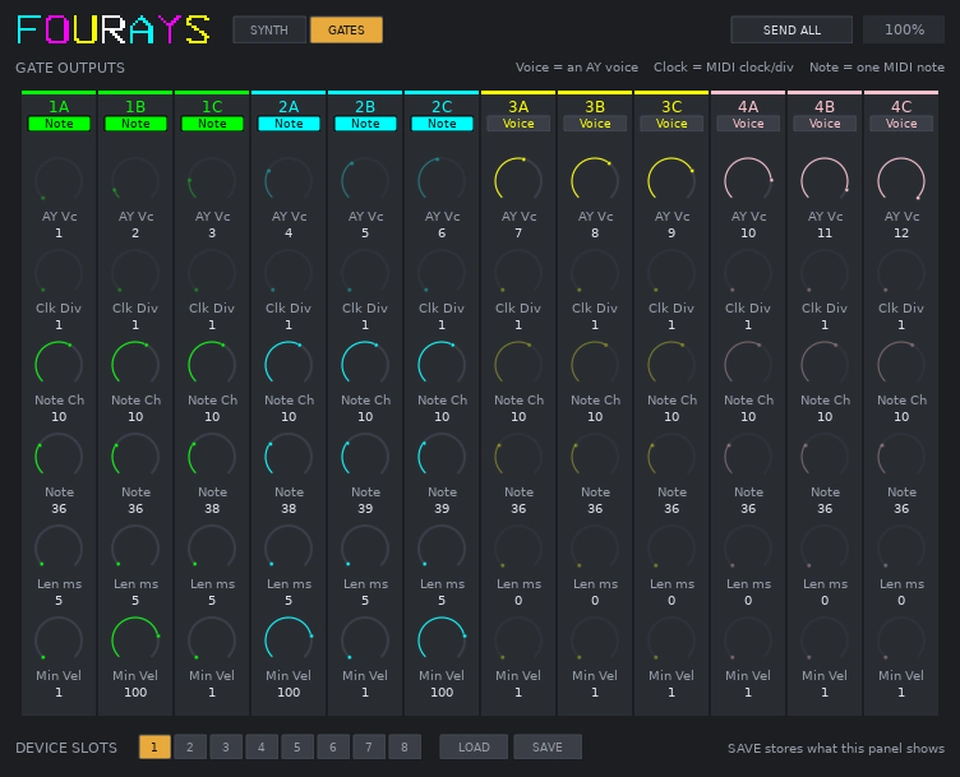
The GateRig demo preset uses six gates for three modules:
| Gate | Patch to | Fires on |
|---|---|---|
| 1A | BD 808 gate | every kick |
| 1B | BD 808 accent | accented kicks only |
| 1C | SD 808 gate | every snare |
| 2A | SD 808 accent | accented snares only |
| 2B | Clap 909 gate | every clap |
| 2C | Clap 909 accent | accented claps only |
An accent output fires as well as the gate, not instead of it, which is what an 808's accent input wants: it raises the level of a hit that is also being triggered and does nothing on its own. The same arrangement layers anything else you are driving, with the second output coming in on top of the first above its threshold. It cannot switch between two things, because a gate has a velocity floor and no ceiling.
Configuration slots
The eight configuration slots are shown along the bottom of the gates page. Select a slot and then use LOAD or SAVE. SAVE stores the configuration which the panel is currently showing.
SEND ALL
The plugin sends its configuration to Fourays when your DAW loads the session, and again whenever you load a preset. Neither of these will happen if you switch your Fourays on after the session has already started, so the SEND ALL button resends the channel map and every control value.
It is also the first thing to try if the sound has stopped for no obvious reason.
Demo songs
Five demo songs are included with the plugin, each of them a MIDI file with a
matching preset. The Windows installer places them in
C:\Users\Public\Documents\Fourays Demos, and on Linux they are in the zip.
| Song | What it demonstrates |
|---|---|
Arcade | Four independent parts, one per chip |
SlowMachine | Nine voices in unison as a drone, three playing the chords and the tune over it |
SplitBassAndBleeps | Voices from different chips sharing a channel |
GlassEngine | Detune swept across a unison stack, for chorus and flange |
GateRig | Six gates driving external drum modules, with gate and accent |
Load the preset first and then import the MIDI file. The README.md alongside
them covers the details, including which gate to patch where for GateRig.
If something is not working
Fourays displays a MIDI activity screen while MIDI is arriving, which shows which channels are being received, which voices are sounding, and whether the last configuration was understood. Between them these will usually tell you where the problem is.
| On the screen | What it means |
|---|---|
| No channels lighting up | Nothing is reaching the device, so check your track routing and MIDI filtering |
| Channels lit but no voices | The notes are arriving but no voice is assigned to that channel, so check the Channel controls and press SEND ALL |
| Voices lit but no sound | Check the chip volume, and whether the envelope is routed to that voice |
config ... IGNORED 0 | The configuration arrived but was not understood, which means your firmware and plugin are from different versions |
Licensing
The plugin is free software under the GNU General Public License v3, same as the firmware and the hardware designs, and the sources are on Bitbucket. A copy of the licence is in the installer and in the Linux zip. There is no warranty, as the licence sets out.
It is built against Steinberg's VST3 SDK, which has been MIT licensed since version 3.8.1. Older advice that a VST3 plugin cannot be GPL licensed refers to the earlier SDK licensing and no longer applies.
| Component | Licence |
|---|---|
| VST3 SDK | MIT, © Steinberg Media Technologies GmbH |
| VSTGUI | BSD 3-Clause, © Steinberg Media Technologies GmbH |
The full component list, including the firmware, is on the updates page.
VST is a registered trademark of Steinberg Media Technologies GmbH. Fourays is not affiliated with or endorsed by Steinberg. AY-3-8910 was a General Instrument product.